Safe Zone Functions
The Safe Zone feature is a protective mechanism that safely decelerates axes before they move through user-defined boundaries. You can specify these boundaries on two or more axes to make a “safe zone,” which can be visualized as an n-dimensional space. You can configure a safe zone to prevent axes from exiting the safe zone or from entering the safe zone. When motion goes near a safe-zone boundary, it smoothly decelerates to a stop one count away from the boundary.
You can use a maximum of 32 safe zones at the same time and can apply two or more safe zones to the same axes. Each safe zone is indexed from 0 - 31.
WARNING: Safe zones do not protect drive motion such as Home Motion, Travel Limit Functions, or the TuningSetMotorAngle() Function.
The example that follows shows how to use the safe zone functions that are explained in the sections on this page.
Program Example: Safe Zone
SafeZoneSetType(2, SafeZoneType.NoEnter)
SafeZoneBoundaryAdd(2, X, 0, 4)
SafeZoneBoundaryAdd(2, Y, 0, 2)
// Turn on the safe zone.
SafeZoneOn(2)
// … execute motion that is protected by the safe zone.
// Remove the X-axis boundary from the safe zone.
SafeZoneBoundaryRemove(2, X)
// … execute motion that is protected by the safe zone.
// Turn off the safe zone and remove all of its boundaries.
SafeZoneOff(2)
SafeZoneBoundaryRemoveAll(2)
Enable and Disable Safe Zone
The SafeZoneOn() and SafeZoneOff() functions start and stop the safe zones in your program.
 function SafeZoneOn($zone as integer)
Enables the specified safe zone.
Arguments
$zone The safe zone to enable.
function SafeZoneOff($zone as integer)
Disables the specified safe zone.
Arguments
$zone The safe zone to disable.
Safe Zone Type
The behavior of a safe zone depends on its SafeZoneType. These types are specified as follows:
|
SafeZoneType.NoEnter |
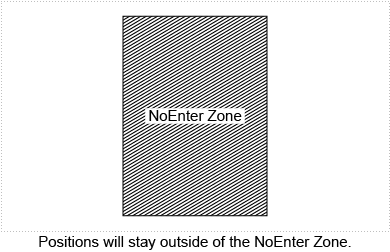
Positions stay out of the zone. |
|
SafeZoneType.NoExit |
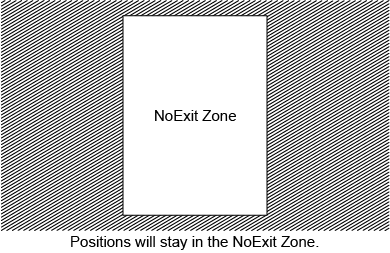
Positions stay in the zone. |
|
SafeZoneType.NoEnterAxisFault |
Positions stay out of the zone. If the safe zone is violated, the controller generates a safe zone axis fault. |
|
SafeZoneType.NoExitAxisFault |
Positions stay in the zone. If the safe zone is violated, the controller generates a safe zone axis fault. |
The SafeZoneSetType() function lets you set the SafeZoneType for a safe zone. If a safe zone is configured to generate an axis fault, the controller generates the fault as AxisFault.SafeZoneFault.
WARNING: The controller generates an axis fault only if you set the corresponding bit in the FaultMask parameter.
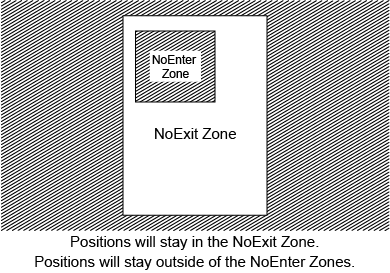
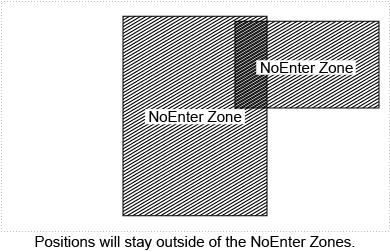
The diagrams that follow show typical safe-zone configurations.
 function SafeZoneSetType($zone as integer, $zoneType as SafeZoneType)
Sets the safe zone type for the specified safe zone.
Arguments
$zone The safe zone on which to set the safe zone type.
$zoneType The safe zone type to set.
Boundary Configuration
IMPORTANT: The ReverseMotionDirection Parameter has no effect on safe zones. If you enable this parameter, you must adjust your safe zone boundaries to operate correctly with the reversed programming direction.
A safe zone can have a maximum of 32 dimensions. Each dimension of a safe zone is determined by the lower bound and upper bound on an axis. To specify the lower and upper boundaries, use the SafeZoneBoundaryAdd() function.
To calculate the lower and upper boundaries of a safe-zone dimension, use the procedure that follows:
How to calculate safe-zone boundaries
- Move the axis to the physical position where you want the lower boundary. Record the value of the Position Command or Position Feedback.
- Subtract the value of the HomePositionSet Parameter from the value that you recorded in the previous step. If the ReverseMotionDirection Parameter is set to Enabled, multiply this value by -1. Use the result for the lower boundary.
- Move the axis to the physical position where you want the upper boundary. Record the value of the Position Command or Position Feedback.
- Subtract the value of the HomePositionSet Parameter from the value that you recorded in the previous step. If the ReverseMotionDirection Parameter is set to Enabled, multiply this value by -1. Use the result for the higher boundary.
IMPORTANT: The values of the safe-zone bounds are always relative to the home position, which is usually at 0.0. When you use the HomePositionSet parameter, the application shows a value that is different from 0.0 at the home position. But the configuration of the safe-zone boundaries stays relative to a 0.0 home position. For more information about the home position, see the Home Motion section of Motion Functions.
The lower boundary must always be lower than the upper boundary. If the value of the lower boundary is greater than the value of the upper boundary, one of the conditions that follow occurs:
- A NoExit zone is always violated.
- A NoEnter zone is never violated.
function SafeZoneBoundaryAdd($zone as integer, $axis as axis, $lowerBound as real, $upperBound as real)
Adds a boundary to the specified safe zone.
Arguments
$zone The index of the safe zone on which to add a boundary.
$axis The axis that represents the boundary to add.
$lowerBound The safe zone lower boundary, specified in user units.
$upperBound The safe zone upper boundary, specified in user units.
function SafeZoneBoundaryRemove($zone as integer, $axis as axis)
Removes the specified boundary from the specified safe zone.
Arguments
$zone The index of the safe zone on which to remove a boundary.
$axis The axis that represents the boundary to remove.
function SafeZoneBoundaryRemoveAll($zone as integer)
Removes all boundaries from the specified safe zone.
Arguments
$zone The index of the safe zone on which to remove all boundaries.
Deceleration
When a safe-zone violation occurs on an axis, motion decelerates as follows:
- The axis decelerates by using a linear ramp type. Refer to Motion Setup Functions for more information about linear ramp types.
- In multi-axis synchronous moves, all axes that are part of the move are stopped. If one or more axes that are part of this move are not in violation of a safe-zone boundary, they decelerate at the AbortDecelRate.
- In multi-axis asynchronous moves, only the axes that violate the safe-zone boundaries are stopped.
- If the axis is a follower axis to a leader axis, such as in gearing motion or camming motion, then the leader axis decelerates at its AbortDecelRate and the leader-follower relation is removed.
Scanning Rate
The safe-zone feature examines the positions and velocities of each specified axis for violations by scanning the trajectory at the Position Update Rate of the drive.
WARNING: If the motion occurs at a high rate of speed while using a small NoEnter zone, the motion might pass through the NoEnter zone.


