Infinite Field of View (IFOV)
IMPORTANT: IFOV functionality is available only when you use a PC-based controller.
Tip: For a comprehensive guide to set up IFOV for Automation1 Studio, refer to IFOV Setup Guide for Automation1 Studio (you must view this page in your browser to use the link).
Infinite Field of View (IFOV) supplies seamless marking over a field of view that is larger than the field of view of the galvo scan head. Automation1 combines the motion of the galvo scan head of the GI4 or GL4 with the motion of traditional servo axes to extend the field of view of the galvo scan head.
When you program motion to the galvo scan head over an extended field of view, the controller automatically commands motion to the servo and galvo axes. The controller maintains the high throughput of the galvo axes and the extended travel of the servo axes.
Simplify Your Infinite Field of View (IFOV) Setup
The IFOV Setup Guide for Automation1 Studio helps you unlock the full potential of high-speed, large-area laser processing. This guide tells you how to set up and use IFOV, and includes a ready-to-use AeroScript Library. This library lets you configure IFOV from a single line in your program, and automate all complex configurations — from setting up axis scaling to encoder data rates.
To start programming continuous, quality motion across an infinite field of view, refer to IFOV Setup Guide for Automation1 Studio (you must view this page in your browser to use the link).
IFOV Functions
IMPORTANT: Before you can use IFOV, you must set the
Use the IfovSetAxisPairs() function to specify the galvo and servo axes for Infinite Field of View (IFOV) to use. This function maps the two galvo axes to the two servo axes.
The motion of the specified galvo axis and the motion of the specified servo axis combine to create a single direction of motion. This function specifies both the horizontal and vertical axis pairs used in IFOV.
- $axisPairH consists of a galvo axis and its corresponding servo axis in the horizontal direction.
- $axisPairV consists of a galvo axis and its corresponding servo axis in the vertical direction.
You can specify an optional $scaleFactorH and $scaleFactorV argument to set the scaling from the servo axis to the galvo axis. The value must be greater than -32,768 and less than 32,787. If you do not specify this argument, the controller automatically calculates the scale factor by using the equation that follows:
Default Scale Factor = (CountsPerUnit of the galvo axis / CountsPerUnit of the servo axis)
Use the IfovSetSize() function to specify the field of view size, in user units, of the galvo head. The field of view of the galvo head is a square. This function specifies the dimension of one of the sides of this square. The value that you specify for this function must be greater than zero.
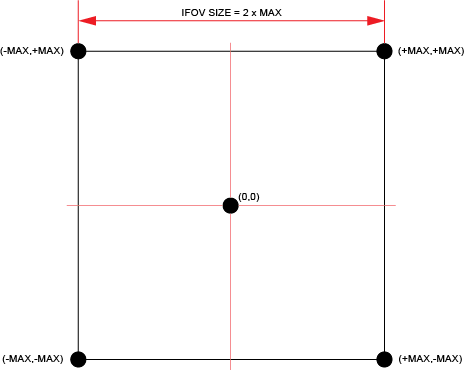
Because the controller tries to operate at the full programmed speed, it commands more of the motion to the galvo head. The controller makes sure that the galvo head does not exit the field of view while in IFOV. If you do not want to use the entire field of view of the galvo head, specify a smaller value for this function.
Use the IfovSetSyncAxes() function to specify more axes to command in IFOV. These axes are added to the axes that you specify for the IfovSetAxisPairs() function. The controller synchronizes all motion functions, I/O functions, and PSO-related functions for all axes in the IFOV configuration. You can specify a maximum of two axes for the IfovSetSyncAxes() function. If you do not want to synchronize more axes, specify an empty array to IfovSetSyncAxes() function.
If you specify axes for this function, the controller synchronizes the following AeroScript functions with IFOV:
- All MoveRapid(), MoveLinear(), MoveCcw(), MoveCw(), and MoveDelay() motion
- AnalogOutputSet() (setting analog outputs)
- DigitalOutputSet() (setting digital outputs)
- PSO functions
- DriveArrayWrite() function
Use the IfovSetTime() function to specify the maximum search time, in milliseconds, that the controller looks ahead into your AeroScript program to generate servo motion in IFOV.
Aerotech recommends that you start with a value of 200 milliseconds for $time.
- The value that you use must be an integer that is divisible by 5 milliseconds.
- The value that you use for $time cannot exceed the value that you specify for the IfovMaximumTime parameter.
The value that you set for $time controls the quantity of servo motion that the controller generates. The quantity of servo motion can have an effect on the overall cycle time of your motion program. For more information, refer to the table that follows.
Table: $time Argument Values
|
<SearchTime> |
Motion Effect |
Latency Effect |
|---|---|---|
|
Smaller values |
More servo motion |
Lower initial latency, higher overall cycle time |
|
Larger values |
Less servo motion |
Higher initial latency, lower overall cycle time |
The search time that the controller uses might be less than the value that you specify. This can occur if the programmed laser motion exits the field of view before the servo axes reach the end of the search time. If you specify a larger value for $time, you usually get a lower overall cycle time.
Use the IfovSetTrackingAcceleration() function to specify the maximum acceleration of the servo axes while in IFOV. You must specify an acceleration that is greater than zero.
When you enable IFOV, the controller automatically limits the speed and acceleration of the servo axes to keep the galvo head in the field of view.
Use the IfovSetTrackingSpeed() function to specify the maximum speed of the servo axes while in IFOV. You must specify a speed that is greater than zero.
When you enable IFOV, the controller automatically limits the speed and acceleration of the servo axes to keep the galvo head in the field of view.
IMPORTANT: Before you can enable IFOV, you must set the IfovConfigurations Parameter. Then home the galvo and servo axes and make sure they are in position.
Use IfovOn() to enable IFOV.
While IFOV is enabled, your AeroScript program must command the laser motion to the galvo axes. The controller automatically moves the galvo axes and the servo axes to make the laser motion path that you programmed.
To get the enabled or disabled state of IFOV, retrieve the IfovEnabled bit of the AxisStatus item.
Use the IfovOff() function to disable IFOV. If the controller is generating motion while you issue IfovOff(), the controller waits for the motion to complete before it disables IFOV. When IFOV is disabled, the controller clears the position registers so that the galvo axes report the position of the galvo head.
 function IfovSetAxisPairs($axisPairH[] as axis, $axisPairV[] as axis)
Configures axes to command in Infinite Field of View (IFOV).
Arguments
$axisPairH The horizontal axis pair. This pair consists of a galvo axis and its corresponding servo axis.
$axisPairV The vertical axis pair. This pair consists of a galvo axis and its corresponding servo axis.
function IfovSetAxisPairs($axisPairH[] as axis, $axisPairV[] as axis, $scaleFactorH as real, $scaleFactorV as real)
Configures axes to command in Infinite Field of View (IFOV).
Arguments
$axisPairH The horizontal axis pair. This pair consists of a galvo axis and its corresponding servo axis.
$axisPairV The vertical axis pair. This pair consists of a galvo axis and its corresponding servo axis.
$scaleFactorH Specifies the scaling from the servo axis to the galvo axis in the horizontal axis pair.
$scaleFactorV Specifies the scaling from the servo axis to the galvo axis in the vertical axis pair.
function IfovSetSize($size as real)
Configures the field of view size of the galvo head in Infinite Field of View (IFOV).
Arguments
$size The field of view size, in user units, of the galvo head.
function IfovSetSyncAxes($axes[] as axis)
Configures more axes to command in Infinite Field of View (IFOV).
Arguments
$axes A list of axes to synchronize in Infinite Field of View in addition to those specified in IfovSetAxisPairs().
function IfovSetTime($time as integer)
Configures the maximum search time that the controller looks ahead in Infinite Field of View (IFOV).
Arguments
$time The time, in milliseconds, that the controller looks ahead.
function IfovSetTrackingAcceleration($acceleration as real)
Configures the maximum acceleration of the servo axes while in Infinite Field of View (IFOV).
Arguments
$acceleration The maximum acceleration, in user units/second squared, of the servo axes.
function IfovSetTrackingSpeed($speed as real)
Configures the maximum speed of the servo axes while in Infinite Field of View (IFOV).
Arguments
$speed The maximum speed, in user units/time base, of the servo axes.
function IfovOn()
Enables Infinite Field of View (IFOV).
function IfovOff()
Disables Infinite Field of View (IFOV).


