Cooling Options [-C0/-C1/-C2 Option]
WARNING: To prevent the drive rack from over-heating, do not obstruct the airflow path at the perforated covers.
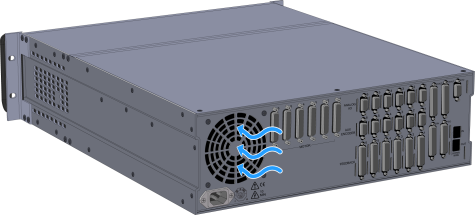
The iXR3/XR3 has a standard rear fan on all models. The fan pulls air into the chassis. Refer to Location of the Rear Fan and Air Flow.
Figure 2-49: Location of the Rear Fan and Air Flow
Built-in fans pull cooling air from the left side through the amplifier compartment. Refer to -C0 Fan Location and Direction of Air Flow.
Figure 2-50: -C0 Fan Location and Direction of Air Flow
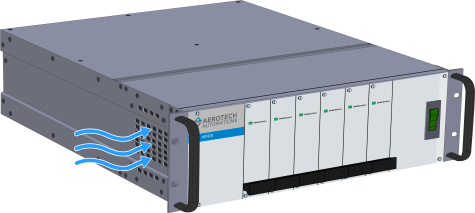
If you ordered the External Cooling option, you will be required to provide forced air-cooling to the drive rack. You will need to direct airflow through the perforated covers. Refer to -C1 Model Showing Perforated Covers for External Fans. The amount of airflow required to keep the drive temperature within a sufficient range is dependent on the operating conditions. Refer to -C1 Option Airflow Specifications for the recommended values for a typical application.
Table 2-62: -C1 Option Airflow Specifications
| Amplifier Type | Airflow Specification |
|---|---|
| PWM Amplifiers (XSP3/XSP3+) (1) | 50 CFM |
| Linear Amplifiers (XSL3) | 300 CFM |
|
(1) An XSP3+ amplifier will operate with better thermal efficiency than an XSP3 amplifier. |
|
Figure 2-51: -C1 Model Showing Perforated Covers for External Fans

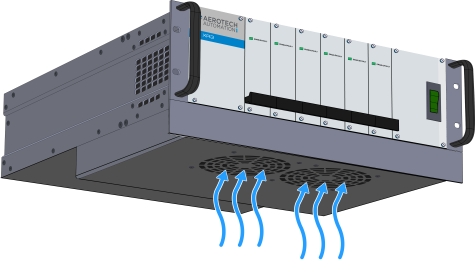
If you ordered the Fan Tray option, Aerotech will attach a 1U fan tray to the bottom of the chassis at the factory. The tray houses two fans that will direct airflow through the drive rack from the bottom to the top. Refer to -C2 1U Fan Location and Air Flow. For the dimensions, refer to Mechanical Specifications
Figure 2-52: -C2 1U Fan Location and Air Flow