Amplifier Replacement
IMPORTANT: You can only install a new amplifier into a slot that has a corresponding control board. Control boards are factory-installed based on the number of axes ordered at the time of purchase.
DANGER: Risk of electric shock.
- Disconnect the Mains power connection.
- Wait at least ten (10) minutes after removing the power supply before doing maintenance or an inspection.
To replace an amplifier:
- Disconnect power.
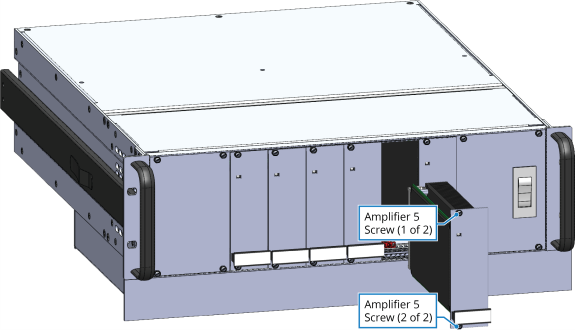
- Loosen the two screws that secure the amplifier. They cannot be removed from the amplifier panel.
- Carefully slide the amplifier out of the slot.
Figure 4-2: Amplifier Removal
-
Insert the new amplifier into the open slot.
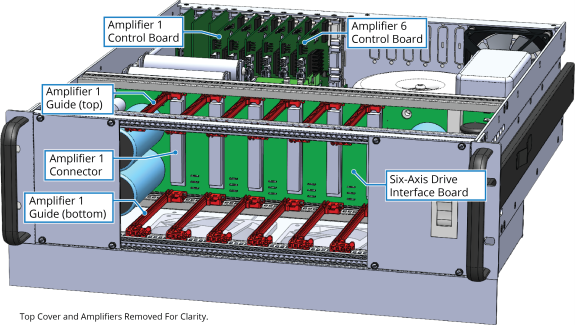
- Be aware that the amplifier must fit into the top and bottom guides
- Make sure that the amplifier is fully seated against the Drive Interface Board connector at the rear of the amplifier slot.
- Tighten the two screws to secure the amplifier card in place.
Figure 4-3: Slot Details